Bluetooth Low Energy RF deviceCode 03925
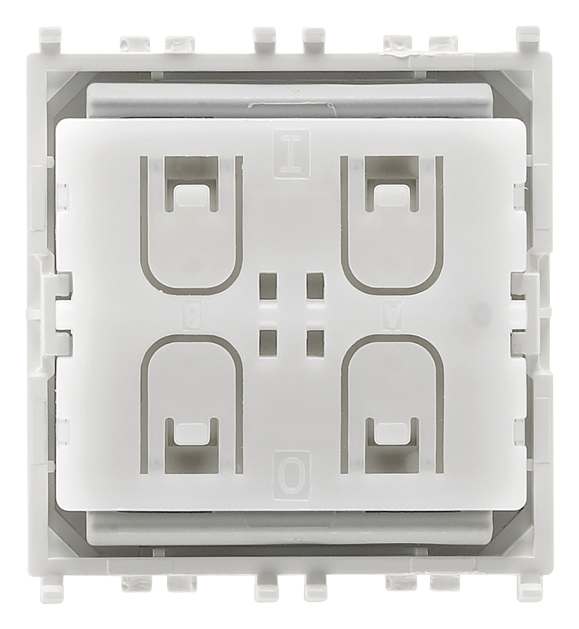
- 03925
- Smart systems&products / Smart switch&sound / Surface mounting components / Non-modular components
- Bluetooth Low Energy RF device
- 4-button flat device with 2.4 GHz Bluetooth Low Energy standard radiofrequency transmitter, energy harvesting supply powered by built-in electrodynamic generator, to complete with Eikon 20506 or 20506.2, Arké 19506 or 19506.2<(>,<)> Idea 16526 or 16526.2 or Plana 14506 or 14506.2 buttons - 2 modules
- Product Status
- 3 - Active
You may also be interested in


Sheets, Manuals, Documentation
- Installation diagrams (1068 kb)
- Multilanguage instructions sheet (1253 kb)
- Manuale installatore (550 kb)
- Installer manual (649 kb)
- Manuale app View Wireless (19693 kb)
- Manuel appli View Wireless (43543 kb)
- Manual app View Wireless (43542 kb)
- Manual View Wireless app (42589 kb)
- Εγχειρίδιο τεχνικού εγκατάστασης (43825 kb)
- Installationsanleitung View Wireless (43598 kb)
Class group
Installation bus systems
Installation bus systems
Class
Light control unit for bus system
Light control unit for bus system
Bus system KNX
No
No
Bus system KNX-RF (Radio Frequency)
No
No
Bus system radio frequency
Yes
Yes
Bus system LON
No
No
Bus system Powernet
No
No
Other bus systems
None
None
Radio frequency bidirectional
No
No
Mounting method
Surface mounted
Surface mounted
Width in number of modular spacings
2
2
With bus connection
No
No
Substation input
No
No
Local operation/hand operation
No
No
With LED indication
No
No
Interface 1-10 V
No
No
Number of inputs for light sensor
0
0
Degree of protection (IP)
IP40
IP40


32. FCC - USA

33. ISED - Canada

37. Marking - Morocco

40. Bluetooth technology


Minimum order quantity: 1 NR
Barcode

8007352596054
1 NR
5.1x4.3x5.3 [cm]
41.5 [g]

8007352596061
6 NR
14.4x11.6x6 [cm]
297.4 [g]
| Question: | Can the EnOcean control be integrated with gateway? |
|---|---|
| Answer: | Yes. Battery-free radio controls can be added and paired with the devices configured in the system, which will allow them to be managed. |
| Question: | How is it configured? |
| Answer: | The device is configured using the VIEW Wireless App, associating the radio device as an accessory to a connected control already installed in the electrical system and configured using the same App. |
Didn't find the answer you were looking for?
Share

Legal
Vimar reserves the right to change at any time and without notice the characteristics of the products reported. Installation should be carried out by qualified staff in compliance with the current regulations regarding the installation of electrical equipment in the country where the products are installed. For the terms of use of the information on the product info sheet see Condizioni di utilizzo.